WhyWhat it doesRecordingDesktopHow calls workCostQuestionsAccountGet WozApp
Made in South Africa · Android

Woza.
Call anyone.

Private messages and calls between WozApp users, and calls to any phone number in South Africa — over your data, not airtime.

End-to-end encryptedThey don't need the appServers in South Africa
Why WozApp

Woza means come. Come talk. Come call. Come through. It's an everyday South African invitation, and it's the whole idea.

WozApp keeps your conversations private, and puts a call to any phone in the country one tap away — without buying airtime first.

Chats and calls between WozApp users are end-to-end encrypted, and stay that way. A call to an ordinary phone only becomes an ordinary call at our exchange in South Africa, never before.

Built for the phones people actually carry: light on data, quick on budget Android, and clear about what things cost.

What it does

One app for your people, and for everyone else's phone.

Free, private chat and calls with other WozApp users. And when they're not on WozApp, dial their number anyway.

Call any phone

Any number. No app needed on their side.

Dial a mobile or landline straight from WozApp. It rings like a normal call on their phone and runs on your data instead of airtime. "Press 1 for…" menus and voicemail work too.

MobileLandlineCall-centre menus
New call
+27 31 ••• ••••
Rings as a normal call · uses data
123456789*0#
Your own number

A number people can ring you on, from any phone.

Get your own South African number on WozApp. When someone dials it from an ordinary phone, WozApp rings — even with the app closed and the screen locked.

Rings when the app is closedAnswer or decline like any call
Incoming · your WozApp number
?
Unknown
+27 21 ••• ••••
Calling from an ordinary phone
DeclineAnswer
Private by design

Encrypted on your phone. Decrypted on theirs.

Messages, voice notes, photos and calls between WozApp users are end-to-end encrypted with open, audited cryptography. Our servers run in South Africa and never see what you say to each other.

Open, audited encryptionLocal PIN, no cloud copy of your keys
SiphoWozApp · online
Messages and calls are end-to-end encrypted. Only you and Sipho can read them.
Woza, are you coming to Ma's on Sunday?
Ja, I'll bring the meat. Call you when I leave.
0:12
Message
Built for here

Light on data. Quick on any Android.

Works over Wi-Fi or mobile data on the phones people actually carry. Photos, voice notes and video in your chats. Backups you control. And a PIN that stays on your phone.

Wi-Fi or mobile dataGroups & storiesEncrypted backups

Chats

SiphoVoice note · 0:12
2
Thandi MokoenaCall · 4 min · over data
FamilyNaledi: Photos from Sunday 📷
+27
+27 31 ••• ••••Called · 2 min
KhayaSharp, see you then
Call recording

Record the calls that matter. They never leave your phone.

One tap during any call — to a phone number or to another WozApp user — and the whole conversation is saved on your device, in your voice and theirs.

  • Tap once, in the call. A red REC chip shows while it's on. Stop any time.
  • Stored on your phone, encrypted. Nothing is uploaded — no cloud, no server, no sharing built in.
  • Play it back properly. A waveform you can scrub, ±10 seconds, playback speed, and a note you can search later.
  • The other WozApp user is told. On calls between WozApp users, a notice says the call is being recorded.
Is that allowed? In South Africa you may record a call you take part in. Recordings are yours: they stay on your phone and WozApp never sees them.
REC 04:12

Recordings

Today
Thandi MokoenaVoice call · 4:12 · "quote for the roof"
+27
+27 31 ••• ••••Phone call · 2:50 · municipal account
Yesterday
SiphoVideo call · 6:46
KhayaVoice call · 1:12
Thandi Mokoena1:46 / 4:12
-10+10note
Encrypted on this phone · not backed up or shared
Also on your computer

Your chats and calls, on the big screen.

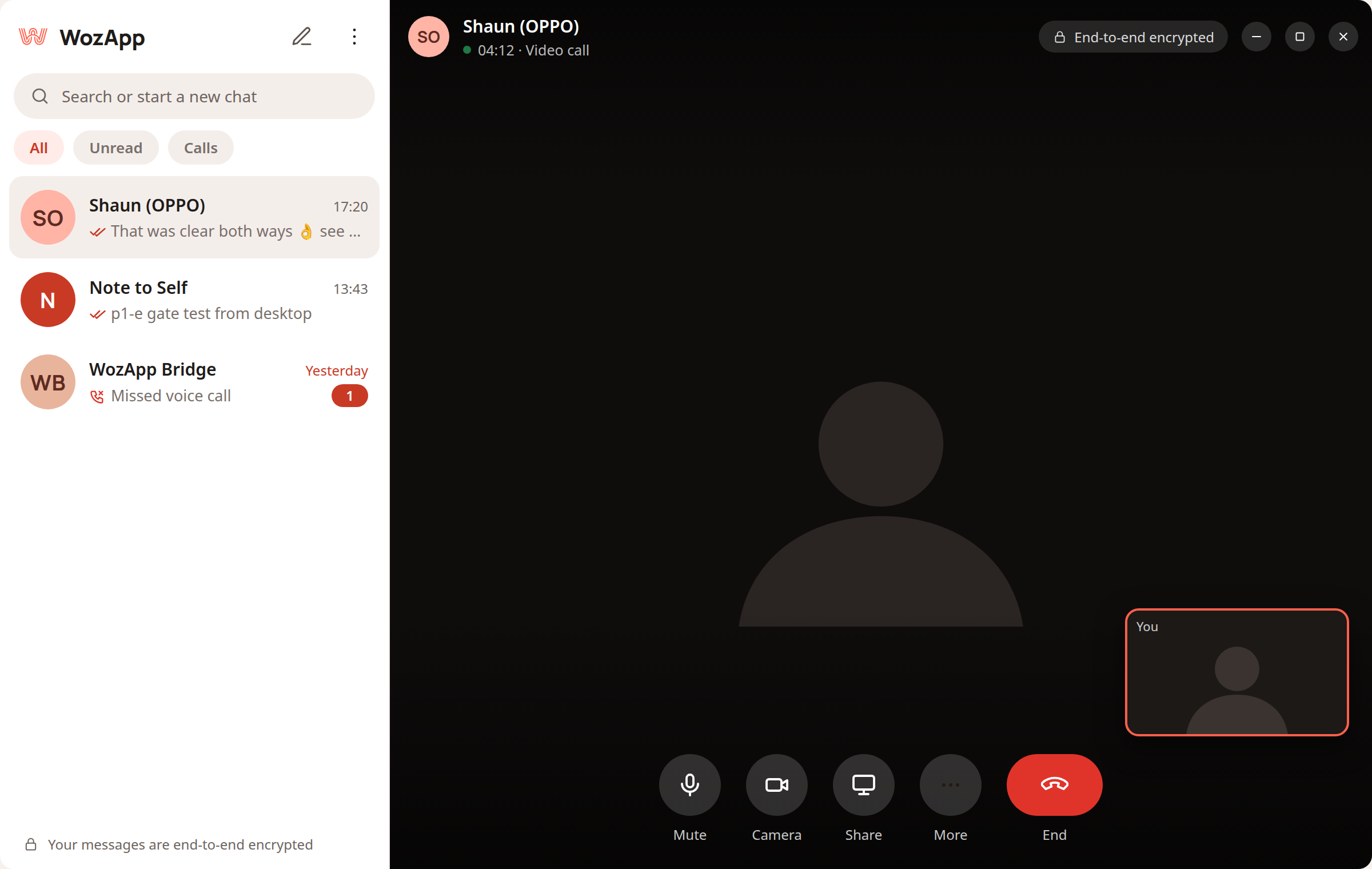
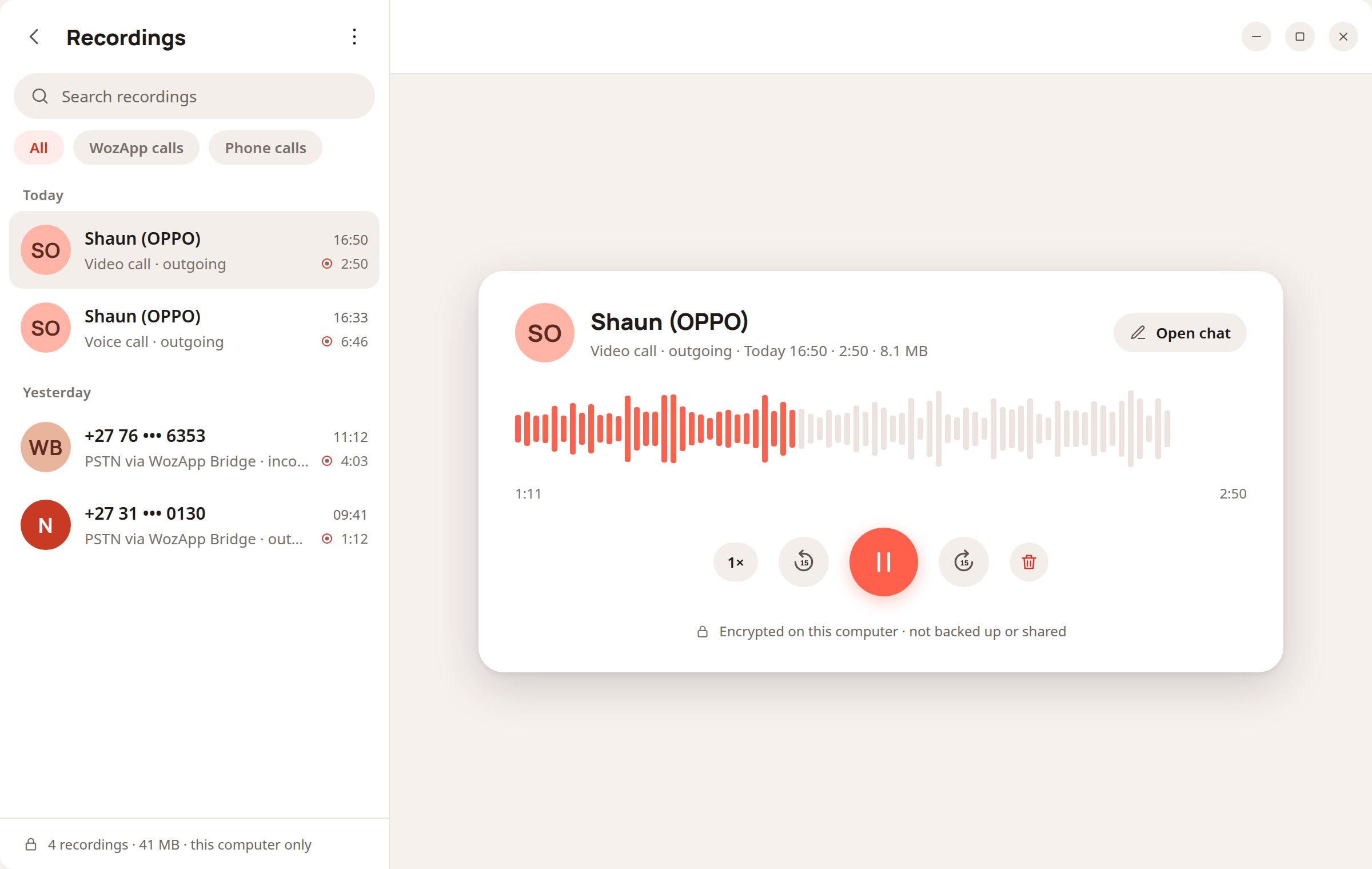
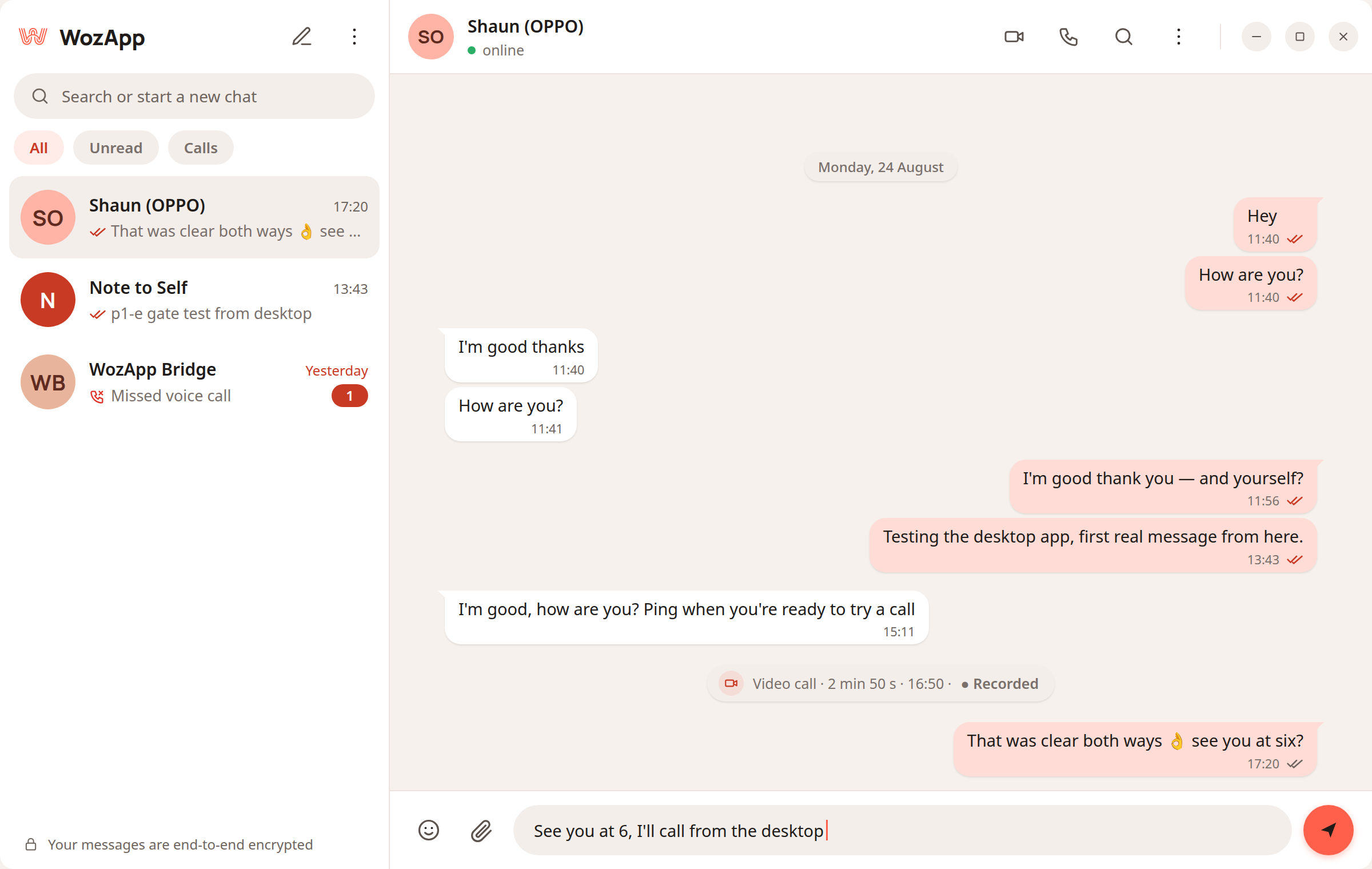
Scan a code with your phone and the WozApp desktop app picks up where you left off — messages, voice and video calls, and recording, on Linux today and Windows next.

Screenshot · Linux build
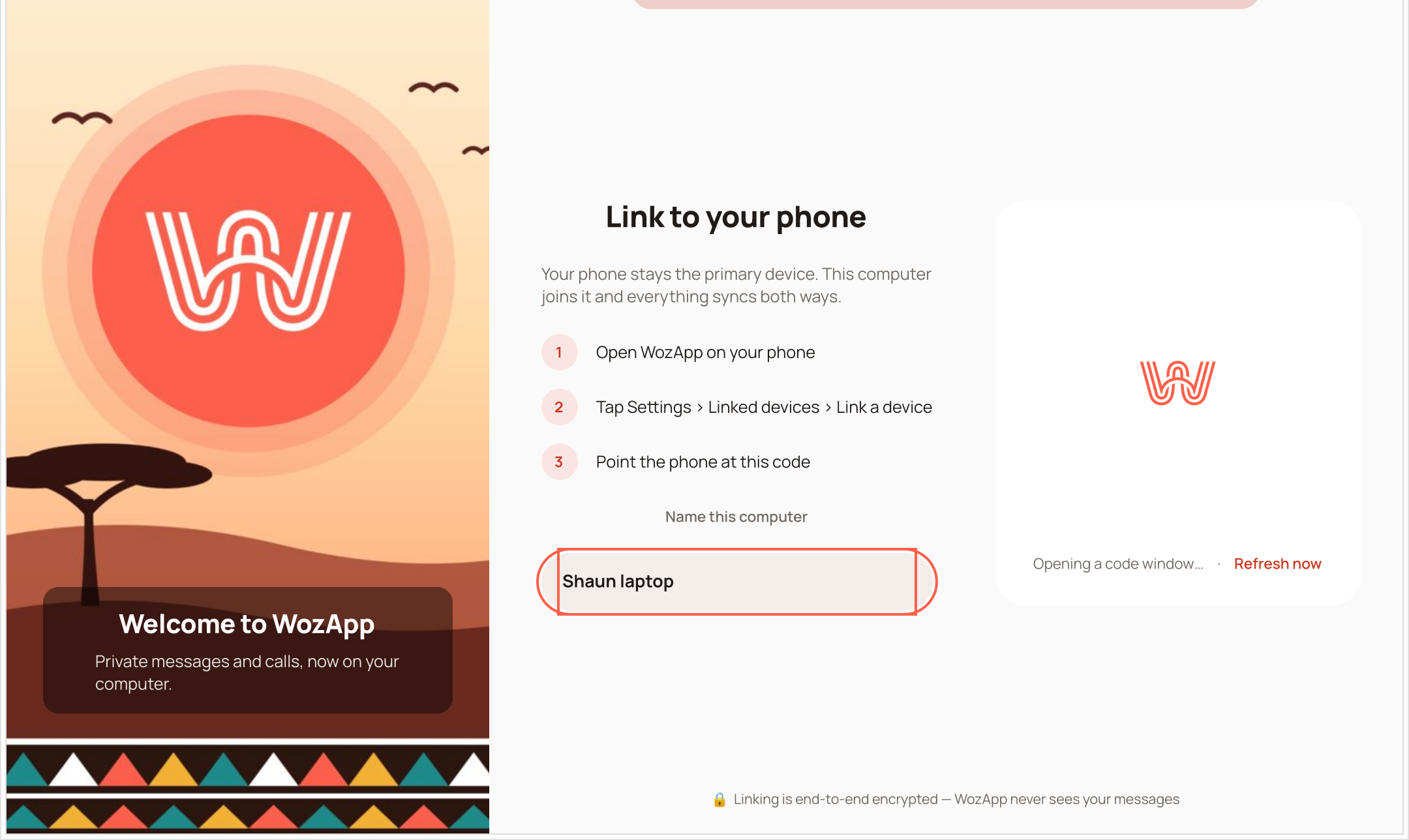
WozApp desktop, first run: a welcome panel with the WozApp mark over a sunset, and a Link to your phone panel with three steps, a name-this-computer field and the space where the QR code appears.
WozApp desktop: chat list on the left, an open conversation on the right, a coral send button.
WozApp desktop: a video call in progress, end-to-end encrypted, with mute, camera, share and end controls.
WozApp desktop: the Recordings view with a searchable list and a waveform player.
First run. Scan the code with your phone and this computer joins your account.

Link it with a code

Open WozApp on your phone, scan the code on the screen, and the desktop app is signed in. No second account.

Voice and video, recorded if you want

Call other WozApp users with a headset or webcam. The same one-tap recording, kept on this computer.

Linux now Windows next

A small native app, not a browser in disguise — light on memory, quick to open.

How a call works

Your voice, your data, one exchange.

Calling a phone number from WozApp takes three steps. Two of them happen on your phone.

1

You dial from WozApp

Pick a contact or type a number. The call is encrypted on your phone before it leaves.

2

It travels over data to the WozApp exchange

Still encrypted, on Wi-Fi or mobile data, to our exchange in South Africa — not to a server overseas.

3

Their phone rings, like any call

At the exchange it becomes an ordinary phone call. They answer on whatever phone they have.

Someone calling your WozApp number takes the same path in reverse: their ordinary call reaches the exchange, and WozApp rings on your phone — encrypted from the exchange to you.

What it costs

Free with your people. A number and voicetime for everyone else.

No contract. Nothing to pay until you want your own number, or call an ordinary phone.

WozApp to WozApp

Free

Messages, voice notes, photos, video and calls — on your own data.

  • Unlimited chats and 1-to-1 voice and video calls
  • Groups and stories
  • End-to-end encrypted, always
  • Call recording and the desktop app included
Get WozApp

Your number

Monthly

A South African number that is yours, inside WozApp.

  • People ring you from any phone — even when the app is closed
  • Keypad for call-centre menus and voicemail
  • Keep your number for as long as you keep the plan
  • Cancel anytime, in two taps
Get a numberPrice published before launch

Voicetime

From R 20prepaid

Calls to mobiles and landlines across South Africa, from inside the app.

  • Pay as you go — no contract
  • Charged per minute from your balance, never from airtime
  • Top up in the app, here, or with a voucher
  • Calls show your WozApp number, or a shared one until you have yours
Top upRates published before launch

What a minute costs

WozApp to WozApp
Free
Landlines in South Africa
To be announced
Mobiles in South Africa
To be announced

Billing terms are published together with the rates. Prices include VAT.

Three ways to top up

  • In the appSettings › Voicetime › Top up
  • On this siteAccount › Top up, from any browser
  • With a voucherBuy one at a shop, then enter the PIN
R 100

Minutes to mobiles and landlines appear here once the rates are published.

Questions

The things people ask first.

Short answers. If yours isn't here, ask us — the address is in the footer.

Does the other person need WozApp?

Not to receive a call. Dial any South African mobile or landline and it rings like a normal call on their side. For encrypted chats and free calls, both of you use WozApp.

Does it use airtime?

No. Everything runs on Wi-Fi or mobile data. Calls to ordinary phone numbers are charged per minute inside the app, not from your airtime.

What is voicetime?

Prepaid credit, in rand, that pays for calls from WozApp to ordinary phone numbers. Top it up in the app, on this site, or with a voucher from a shop. Each call to a mobile or landline is charged per minute from your balance — calls to other WozApp users never touch it.

Does voicetime expire?

The rates and the exact terms, including how long a top-up stays valid, are published before launch. Whatever the terms, your balance is only ever spent on calls to ordinary phones — never on chats, WozApp-to-WozApp calls, or your data.

Why does a number cost monthly?

Because we rent it. A South African number is leased from a carrier for every month it is held, and the plan passes that on. Using WozApp, calling other WozApp users and topping up voicetime have no monthly fee.

Can I call out without a number?

Yes. Voicetime works on its own. Calls show your WozApp number if you have one, or a shared WozApp number until you do — which means the person can't ring you back on it. Your own number fixes that.

How do I cancel my number?

From Account › Your number, in two taps. It keeps working until the end of the period you've paid for; after that people can't ring it. We hold the number for a while in case you change your mind — the exact period is published with the price.

Can people call me?

Yes. Your WozApp number works from any phone. When someone dials it, WozApp rings on your phone — even when the app is closed or the screen is locked.

How private is it, really?

Between WozApp users, everything is end-to-end encrypted on your phones and nobody in between can read or listen. A call to an ordinary phone is encrypted from your phone to our exchange in South Africa; from there it has to become an ordinary phone call, because that's what the other side can receive.

Which phones does it work on?

Android, including budget phones and phones on mobile data. There is a desktop app for Linux, with Windows next.

Can I record a call?

Yes — any call you're part of, to a phone number or to another WozApp user. Tap Record during the call. The recording is saved encrypted on your phone only; WozApp never uploads it. In South Africa you may record a call you take part in, and other WozApp users are told when you do.

Is there a desktop app?

Yes, for Linux, with Windows in the works. You link it to your phone by scanning a code; it then carries your chats, voice and video calls, and recording. Calls to ordinary phone numbers still go through your phone.

Where are my messages kept?

On your phone. You can switch on an encrypted backup that you control — we store the encrypted file, never the key.
Woza.
Let's talk.

Free between WozApp users. Any South African number, by the minute. Get it for Android.

Exploration notes

Three directions considered

A · Dark-first, reference-faithful

Near-black ground, coral as a sparse accent, Montserrat-style sans. Closest to aiautomationsociety.ai. Reads premium and tech, but cold — and the brand brief says warm, welcoming, local, not a Silicon-Valley clone. Coral on near-black also drifts toward "crypto".

Kept as the dark theme

B · Coral-maximal

The whole page as a coral field, white type and strokes throughout — the icon as a website. Unmistakable, but exhausting over seven sections, and white body text on coral fails accessibility contrast (3.0:1).

Used for hero + CTA only

C · White + coral fields (this page)

White ground, warm ink, coral as fields (hero, CTA, lead plan) and strokes (the mark's W as parallax layers). Matches the shipped icon's white-on-coral language, stays welcoming, and keeps all three scroll mechanics from the reference plus one of our own.

Chosen

Palette (light theme tokens)

coral #FF604Bcoral-deep #CF3A26ink #1C1614ink-2 #5E514Ctint #FBF3F0soft #FFE9E3
  • Brand coral is #FF604B from the shipped icon SVG (the wordmark brief says #FC604C — pick one and fix the brief).
  • Coral on white is 3.0:1 — fine for display sizes, not body text. Small coral text and button fills use coral-deep (4.9:1). On the coral fields, small text is a warm dark ink, headlines white.
  • Neutrals are warm (biased toward coral), never plain grey. Dark theme is designed, not inverted.

Type

  • Gabarito 700/800 for display — friendly, slightly rounded, sturdy; a sibling of the icon's rounded W. Not Inter, not Montserrat.
  • Figtree 400–600 for body — very legible at 16–17px on budget Android screens.
  • DM Mono for phone numbers, timers and eyebrow labels — the product is full of digits, so they get their own voice.

Build recommendation

  • Static HTML + CSS + ~200 lines of vanilla JS, exactly like the reference (Lenis for smooth scroll, optional). No framework, no build step; deployable behind the existing Caddy or any static host.
  • Every effect uses only transform, opacity and filter, reads are batched before writes per frame, and there is no canvas — safe on low-end phones. All motion respects prefers-reduced-motion.

v0.2 iteration (2026-09-02)

  • Contrast: lead cost card body + CTA outline button now warm ink on coral (5.7:1); white kept for display sizes only.
  • Mobile: the Get-WozApp button stays in the nav (mobile-first audience), the hero phone peeks under the fold instead of adding 500px, deck phones show more screen.
  • Shipped ZA avatars in the mocks; ring ripple on the hero call; step numbers legible; entrance + reveal timings shortened.

v0.3 iteration (2026-09-02)

  • New Recording section (dark field, scroll-linked waveform playhead, Android Recordings mock) and Desktop section (tabbed stage with three screens + link/calls/platform facts).
  • FAQ gained recording + desktop answers; the free plan lists recording + desktop; nav links added.

v0.4 iteration (2026-09-02)

  • Hero rebuilt on the app's welcome artwork as four SVG parallax layers (sun + birds / back hill / front hill + tree / static band), with a dusk variant in dark theme. Hero phone mock retired.

v0.5 iteration (2026-09-02)

  • Pattern band dropped from the hero; re-used as a fixed left rail that doubles as the scroll-progress indicator (toggle to compare). Hidden on phones.

v0.6 iteration (2026-09-02)

  • Left rail removed. The scroll-lit band now lives only where it has a job: the call route (horizontal, vertical on phones) and the closing edge under the final CTA.

v0.7 iteration (2026-09-02)

  • Footer rebuilt around the app icon running loader concept 8 (ping-pong light on the exact mark), visibility-gated; wordmark + tagline + section links + legal.

v0.12 iteration (2026-09-07)

  • Cost section v2: three truthful columns (Free / Your number / Voicetime) with the raised middle plan; rate card, top-up routes and a rate-aware calculator below. Every rand lives in app/content/pricing.ts and is null until published.
  • FAQ +5 (voicetime, expiry, why a number costs monthly, calling out without a number, cancelling); Account link in nav, sheet and footer; legal line reframed.
  • Ruling R1: the free tier stays free and the FAQ says why a number costs monthly — the fee attaches to owning a number, never to using WozApp. Plan: docs/plans/website/PLAN-WEBSITE-SUBSCRIPTION-VOICETIME-UI.md.

v0.13 iteration (2026-09-09)

  • Quality bar: axe 0 critical/serious on every route, keyboard-only flows, 0 hydration warnings, Lighthouse mobile 93/97 here and 99/100 on the top-up page (compression, non-blocking fonts, lazy desktop shots).
  • Contrast: --ink-3 and --ok darkened; --coral is now the wordmark brief's #FC604C — white on it clears 3:1, the icon's #FF604B did not. The mock-phone titles are no longer headings.
  • Account area gained soft motion (transform + opacity only, off under reduced motion) — the operator compared soft against off and chose soft.

Still needed from the operator

  • Android screenshots (plug in a phone, unlocked, Screen security off — recipe in note 7), ideally on a demo account.
  • Voicetime rates, the number's monthly price and the top-up terms — the operator list in docs/plans/website/PLAN-WEBSITE-SUBSCRIPTION-VOICETIME-UI.md §7. Every figure renders "to be announced" until it is set.
  • Commissioned wordmark (replaces the interim Gabarito lockup).
  • Real screenshots from the staging APK; optional photography for a photographic hero variant.
  • App download destination (Play listing vs. direct APK) and a contact address.